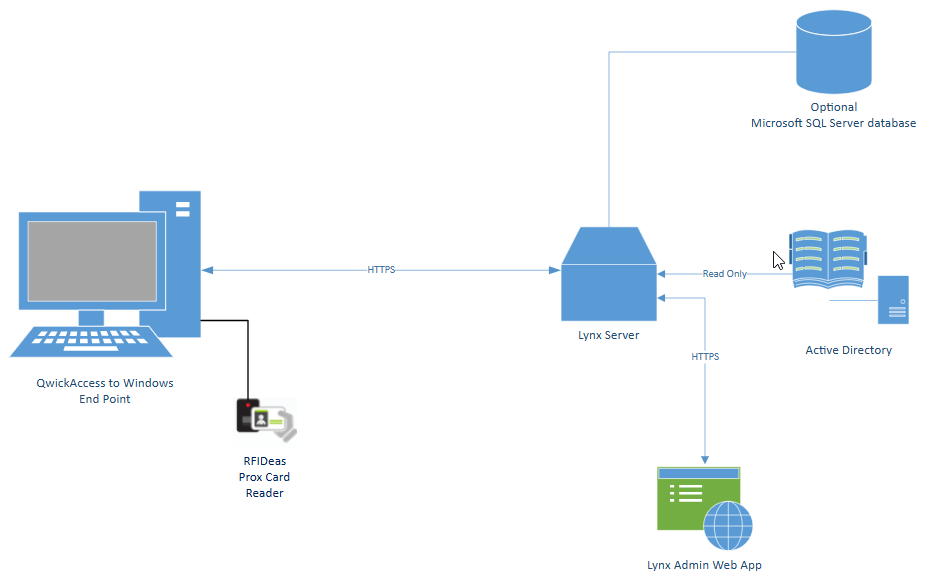
The QwickACCESS to Windows® (QAW) application speeds up user access to their Windows session using a proximity badge or the same badge they would use for physical access or other purposes. QAW reduces the frequency for users to type their passwords, making access to their computer quick, convenient, and maintaining security.
Users login to their Windows session by tapping their badge on the proximity badge reader and entering only their Windows password. The password is then saved for a configurable amount of time. When users leave the workstation, they tap their badge to secure their session. This badge tap will reset the password save time to the full amount configured.
When users return to the workstation and tap their badge, they are immediately reconnected to their Windows session without entering their password (unless their password-save time has expired) and can begin their work. If a user forgets to "tap-out" from their session before leaving a shared workstation, a second user can "tap-over" the first user with their own proximity badge, securing the first user's session and opening their own.
See our QwickAccess Product Overview for the full list of features QA provides.
Solution Architecture