
404 Error After Logging into Lynx Admin Web Page
APPLIES TO
LYNX versions 1.5.x
PROBLEM/NEED
User receives HTTP 404 Not Found error when attempting to login to Lynx admin page using valid credentials.
NOTE: Lynx will properly recognize invalid credentials.
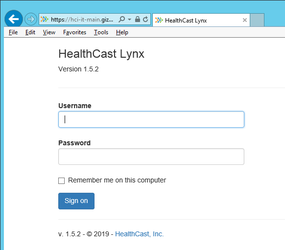
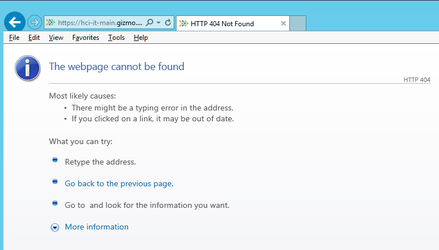
ROOT CAUSE 1: Lynx is configured to login as Local System Account
One cause of this issue is that the HealthCast Lynx server service is configured to log on as a Local System Account. The Local System Account would not have the required permissions to access the Lynx database or perform other necessary functions.
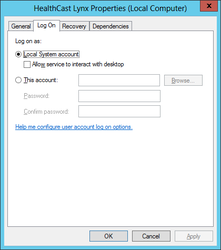
PRESENTATION 1
When this happens, the LYNX logs will include an error similar to the following:
2019-11-18 10:02:53.645 -08:00 [Error] An unhandled exception has occurred: Index was out of range. Must be non-negative and less than the size of the collection.
Parameter name: index
System.ArgumentOutOfRangeException: Index was out of range. Must be non-negative and less than the size of the collection.
Parameter name: index
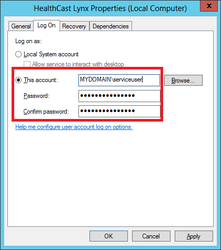
RESOLUTION 1: Configure Lynx service login to use a domain account.
- Configure the HealthCast Lynx server service to log on as a domain user.
- Restart the HealthCast Lynx server service.
ROOT CAUSE 2: Lynx has incorrect ProxCard Table Type or Database Type
If the incorrect ProxCardTableType or DatabaseType is set in the C:\ProgramData\HealthCast\Lynx\config.ini file, Lynx will generate a 404 error after logging in to the Lynx admin page.
PRESENTATION 2
The Lynx log files (C:\ProgramData\HealthCast\Lynx\logs) may also contain database access or table not found errors.
RESOLUTION 2: Verify Lynx has the correct ProxCard Table Type set in the config.ini file
- On the Lynx server, browse to C:\ProgramData\HealthCast\Lynx\ folder and edit the config.ini file with a text editor such as Notepad.
- Check that the DatabaseTypesetting is correct
- 0 - Embedded database (non-SQL)
- 1 - SQL Server Database
- Check that the ProxCardTableType setting is correct
- 0 - Lynx SQL Database
- 1 - XA Server version 4.10 or lower
- 2 - XA Server version 4.11 or higher