
When troubleshooting any issue across the HealthCast product line, support will require an hciSysInfo extract. This extract is a collection of specific registry settings that show all of the most important configuration points for HealthCast software.
When submitting a support case for ExactAccess or EpicAuth/TFA/Epic ProxCard Login Device, please include an hciSysInfo extract.
-
In the app tray, right-click on the ExactAccess system tray icon and select HCI System Info.
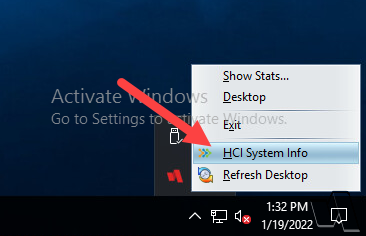
- Note: Alternatively, you can open
C:\Program Files (x86)\HealthCast\eXactACCESSand double-click hcisysinfo.exe.
- Note: Alternatively, you can open
-
A status window will open in the middle of the screen while the extract is generated.
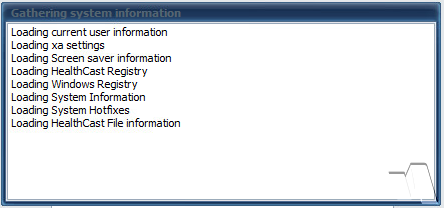
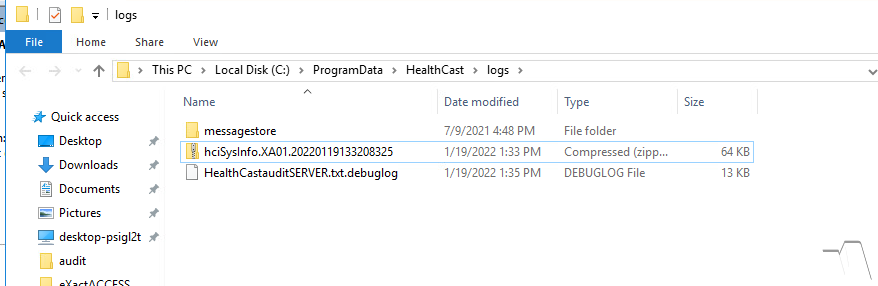
Once complete, a Windows Explorer window will open up directly to the saved path: C:\ProgramData\HealthCast\logs
The hciSysInfo extract will be a ZIP file where the name contains the name of the computer it was generated and a timestamp. Please attach the entire ZIP file to your support case or email to support.
Troubleshooting
Missing hciSysInfo
If you need a copy of hciSysInfo because your machine does not have XA installed (such as an Epic Hyperspace server) or it has been removed somewhere along the line, you can download a copy from here.