
Lynx only provides one report, the All Audit Events report. This report displays all the events that Lynx has audited (ie. recorded in the database).
If you wish to create other reports (with better customized results), you will need to write SQL queries against the Lynx database. In order to do this, you must have Lynx configured to use a Microsoft SQL Server database and not the embedded database. This is because there is no way to connect to and query the embedded database.
This report can become extremely long due to the number of audit events that become available over time (and it does not self-purge after a certain amount of time). This does not affect the system, but the reporting function itself will become slower. It's recommended that you and/or your DBA should meet to discuss an archiving strategy at some point should the report become too slow and unwieldy.
Running the Report
To run the All Audit Events report:
- Sign in to the Lynx administrator tool.
- On the left-hand side, click the Reports tab.
- In the main window, click the All Audit Events link.
.png)
Using the Reports Page
- Events can be sorted by any of the available columns by clicking on the column header.
- The number of records per page can be controlled by using the “Show (X) entries” dropdown box.
- You can explicitly search through the audit events by typing text in the Search text box. Audit events that contain the text typed will be displayed in the list.
.png)
Value Definitions
| Column | Description |
|---|---|
| Id | A system‑generated identifier for the event. Selecting the Id opens the detailed event view. |
| AppName | The name of the Lynx client that generated the event. |
| IpAddress | The IP address of the client system that submitted the event. |
| RequestDateTimeUtc | The date and time (in UTC) that the client system recorded for the request. Lynx does not validate this timestamp; it simply records what the client sends. |
| RequestId | A unique GUID provided by the client system for each request. Lynx records this value but does not enforce uniqueness. |
| SessionId | A GUID representing the client’s session. The client system is responsible for maintaining session continuity. Lynx records the value but does not validate it. |
| MethodName | The name of the method invoked by the client during the request. |
| ResultCode | The result returned by Lynx to the client for the request. |
Detail View
You can get a detail view of an audit event by running the All Audit Events report, then clicking the Id link of the event you are interested in.
.png)
Depending on the particular audit event, some of these fields may not have a value. For example, if the audit event did not occur as the result of a prox card action, then the ProxCardId and ProxCardBitCount fields will not have values.
The following is an example Detail View of an audit event:
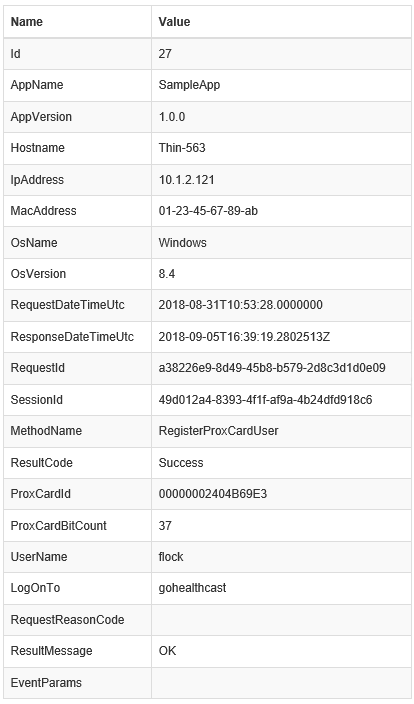
Detail View Value Definitions
An explanation of each of the values in the Detail View is provided below. Each field that is required to have a value for all audit events is designated with “Required” while the others are designated with “Optional”.
| Name | Required? | Description |
|---|---|---|
| Id | Required | Automatically generated by Lynx for each audit event. Provides a unique identifier for the event. |
| AppName | Required | The name of the app sending the request to Lynx. |
| AppVersion | Required | The version of the app making the request. |
| Hostname | Required | The hostname of the system on which the app is running. |
| IpAddress | Required | The IP address of the host system running the app. |
| OsName | Required | The name of the operating system on the client system. |
| OsVersion | Required | The version of the operating system on the client system. |
| RequestDateTimeUtc | Required | The UTC date and time of the request as reported by the client system. Lynx records the value but does not validate it. |
| ResponseDateTimeUtc | Required | The UTC date and time when Lynx generated its response. This reflects the Lynx system time. |
| RequestId | Required | A unique GUID generated by the client app for each request. Lynx records the value as provided. |
| SessionId | Required | A GUID representing the user session tracked by the client app. Lynx records the value but does not validate it. |
| MethodName | Required | The name of the method the client app called (eg. GetProxCardUser, ValidatePassword). |
| ResultCode | Required | The result code returned by Lynx for the request. |
| ProxCardId | Optional | The prox card ID if the request was triggered by a prox card action. Blank otherwise. |
| ProxCardBitCount | Optional | The prox card bit count if the request was triggered by a prox card action. Blank otherwise. |
| UserName | Optional | The username associated with the request, if known. May be blank (eg. unregistered prox card). |
| LogOnTo | Optional | The domain, realm, or area the user belongs to (typically the Windows domain). |
| RequestReasonCode | Optional | A reason code for prox card user record updates. Valid values: 1 = PIN Authentication Failed 2 = Tap-Out 3 = Tap-In 4 = Tap-Lock 5 = Tap-Unlock Blank for other request types. |
| ResultMessage | Required | A short, readable message corresponding to the ResultCode value. |
| EventParams | Optional | Additional data supplied by the client app explaining why the audit record was sent. |